

As they migrated service operations from Oracle to Salesforce, a global electronics and imaging company gave service agents complete customer and product context and visibility using Data 360 and MuleSoft, without importing data from 13 systems into its Salesforce core.
The company, with products spanning consumer devices, print, and enterprise software, was moving its service and repair operations off Oracle and onto Salesforce. The business runs on two Salesforce orgs, one for its enterprise customers (B2B) and one for its consumer customers (B2C), and the migration came with a clear expectation: a service agent that would see the whole customer and product picture without leaving Salesforce to find it.
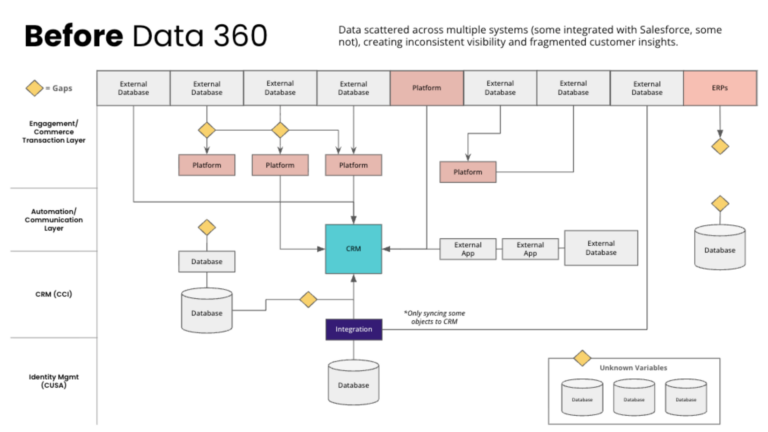
That picture was scattered across roughly 13 different systems. Customer records sat in one place, repair history in another, product data in a third, and knowledge content on a hosted server of its own, alongside an ERP and a B2C e-commerce store. The instinct in a migration like this is typically to connect every source to Salesforce and be done with it. That instinct is where the cost was hiding though.
The more useful question was not how to connect all 13 systems. It was how much of their data needed to live in Salesforce at all. Answering it turned the project into a series of decisions about what to build, and, more often, what not to.
Service Data Lived Everywhere Except Salesforce
Complete context is easy to ask for and expensive to assemble. To work a single case, an agent might need repair history from one system, product details from another, customer records from a third, and a knowledge article from somewhere else again. The data existed. It just did not live where the work happened, so agents assembled it by hand, tool by tool.
The company set a practical bar for the new platform:
✓ Complete customer and product context for agents, inside Salesforce
✓ No unnecessary records created in Salesforce core
✓ Lower long-term integration complexity and maintenance cost
✓ Room to support marketing and segmentation use cases later
✓ A platform that stayed fast and reliable as service volume grew
The first two points pull against each other if you build the obvious way. More context normally means more data in the org. The design had to deliver the visibility without the weight.
The Obvious Plan Was to Integrate Everything
At the start, every external system was treated as a candidate for direct integration, with MuleSoft as the assumed pattern for all of them. It is a defensible default. MuleSoft is built for exactly this kind of connectivity.
But 13 point-to-point integrations means far more than 13 build efforts. Each one is a connection to monitor, maintain, and eventually untangle, a steady flow of external records swelling the core org, and a maintenance bill that grows every year the business does. The company would have connected everything, then carried the upkeep of everything, whether or not each system needed a live, two-way relationship with Salesforce. Most of them did not.
Discovery Split the Data Into Two Kinds
Scoping the work surfaced the distinction the default had missed. The data fell into two groups, and they called for different tools.
- Read-only data: needed so agents could see context during a service interaction. Nobody edited it from inside Salesforce.
- Action data: where Salesforce genuinely had to create or update records and drive a downstream process.
Most of the 13 systems held the first kind. Once that was clear, the architecture nearly designed itself: use the heavy, action-oriented integration only where action actually happened, and find a lighter way to make everything else visible.
Data 360 for Visibility, MuleSoft for Action
Lane Four delivered a hybrid model that gave each tool a defined job.
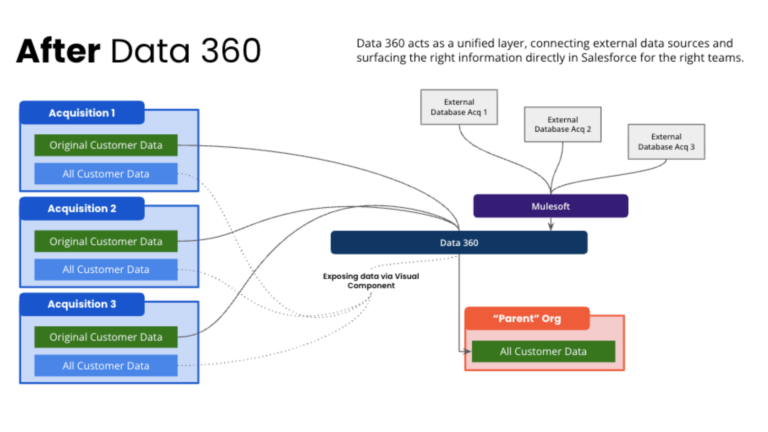
Data 360 (formerly Data Cloud) handled visibility. Read-only data was ingested into Data 360 rather than replicated into Salesforce, which kept millions of records out of the core org. Agents reached it through Screen Flows built into the service experience, so repair history and external product and customer context appeared in the flow of work rather than in another browser tab. The team ran this without profile unification. A direct match, an email resolving to the right repair record, was enough for what service needed, and it skipped the cost and complexity of identity resolution the use cases never required.
MuleSoft handled the action. Where Salesforce had to create or update records, or start a downstream process, MuleSoft carried the integration. Confining it to that work kept the core org clean and focused on service, instead of padded with data it only needed to look at.
The result was a rule anyone on the team could apply: if Salesforce needs to act on the data, integrate it; if Salesforce only needs to show it, surface it through Data 360.
The Feature They Chose Not to Ship
Not every option survived contact with testing, which is exactly what testing is for. The team explored using Data 360 to filter the service chatbot’s knowledge with prompt and vector search. In practice it added enough latency to work against the one thing the feature existed to improve, a fast answer, so they reverted to traditional search strings. The capability was worth trying. It was not worth the delay for this use case, and shipping it anyway would have traded real usability for a more impressive architecture diagram.
Richer Service, Leaner Platform
Matching each source to the right mechanism left the company with a service platform that carried more context and less weight than the obvious plan would have. The work:
✓ Avoided 13 separate point-to-point Salesforce integrations, and the standing maintenance they would have required
✓ Kept the core org clear of unnecessary data volume and the performance risk that comes with it
✓ Put complete customer and product context in front of agents without changing the service workflows they already knew
✓ Established an integration model the team can extend system by system, on the same terms
✓ Created a foundation for future marketing and segmentation, on the Data 360 investment already in place
✓ None of this depended on a bigger Salesforce footprint. It depended on a smaller one, used deliberately.
Data 360 as an Access Layer, Not a Warehouse
Data 360 is usually introduced as a unification engine or an analytics platform. Its most valuable role on this project was simpler: an access layer that put distributed data in front of agents without moving it into Salesforce. Paired with MuleSoft for the integrations that genuinely drive action, that separation produced a cleaner architecture than any single default could have.
The principle travels well beyond one service migration. Visibility and ownership are two different problems, and solving them with the same tool is how orgs end up paying for years. Not every service use case needs profile unification or an AI feature to deliver value. Performance and usability, not novelty, should decide what ships. And deciding what to keep out of Salesforce is as much a part of good integration design as deciding what to build into it.
If your team is migrating a service platform, weighing Data 360 against a stack of point-to-point integrations, or trying to give agents more context without more overhead, let’s chat.
Let's chat!
